As the number of self-hosted services grows, so does the number of databases I need to manage. I now have 6 PostgreSQL databases running in my home lab, which I needed to manage and back up.
Up until now, I have already been managing them in a single PgAdmin instance, but all the backups were scheduled separately with separate k8s job manifests. It’s time to end the pain.
Overview
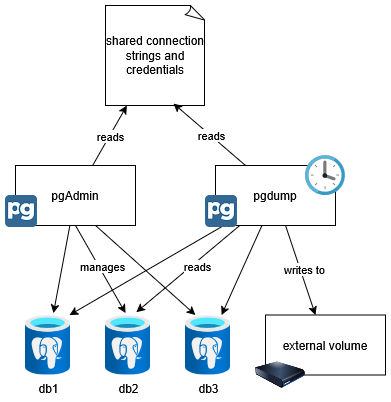
The idea is to manage all PostgreSQL databases in a single PgAdmin instance, and also a single backup job that backs up all databases at once. By sharing a single configuration between these, each time there is a new database, I only have to add the connection information once.
Configuration
To add servers to pgAdmin at startup, I use the following configmap, in the format specified in the pgAdmin documentation. The documentation also includes a way to export existing servers from the GUI, which is how I plan to update this configmap in the future.
 1
 2
 3
 4
 5
 6
 7
 8
 9
10
11
12
13
14
15
16
17
18
19
20
21
22
23
24
25
26
27
28
29
30
31
32
33
34
35
|
apiVersion: v1
kind: ConfigMap
metadata:
  name: pg-servers
  namespace: admin
data:
  dbs.json: |
    {
      "Servers": {
        "1": {
          "Name": "db1",
          "Group": "Servers",
          "Host": "db1.ns1.svc.cluster.local",
          "Port": 5432,
          "MaintenanceDB": "postgres",
          "Username": "postgres",
          "KerberosAuthentication": false,
          "ConnectionParameters": {
            "sslmode": "prefer"
          }
        },
        "6": {
          "Name": "db2",
          "Group": "Servers",
          "Host": "db2.ns2.svc.cluster.local",
          "Port": 5432,
          "MaintenanceDB": "postgres",
          "Username": "postgres",
          "KerberosAuthentication": false,
          "ConnectionParameters": {
            "sslmode": "prefer"
          }
        }
      }
    }
|
It’s also possible to specify password by specifying a file with the password in it in this json, but since the pgAdmin GUI does not support exporting it, I decided to leave it out and enter the password manually in the GUI.
Therefore, the passwords for cronjob is stored in a separate secret.
Passwords are stored in a secret, which is currently only being used by the backup job.
1
2
3
4
5
6
7
8
9
|
apiVersion: v1
kind: Secret
metadata:
  name: db-credentials
  namespace: admin
type: Opaque
stringData:
  db1: password123
  db2: password123
|
pgAdmin
Setup of pgAdmin is pretty straightforward. Just mount the servers.json configmap at /pgadmin4/servers.json, and it will automatically load the servers at startup.
The pgAdmin container does not automatically configure the ownership of the /var/lib/pgadmin, so I added an init container to set the ownership to 5050:, which is the user and group that pgAdmin runs as.
 1
 2
 3
 4
 5
 6
 7
 8
 9
10
11
12
13
14
15
16
17
18
19
20
21
22
23
24
25
26
27
28
29
30
31
32
33
34
35
36
37
38
39
40
41
42
43
44
45
46
47
48
49
50
51
52
53
54
55
56
57
58
59
60
61
62
63
64
65
66
67
68
69
70
71
72
73
74
75
76
77
78
|
apiVersion: v1
kind: PersistentVolumeClaim
metadata:
  name: pgadmin-pvc
  namespace: admin
spec:
  accessModes:
    - ReadWriteOnce
  resources:
    requests:
      storage: 1Gi

---

apiVersion: apps/v1
kind: Deployment
metadata:
  name: pgadmin
  namespace: admin
  labels:
    app: pgadmin
spec:
  replicas: 1
  selector:
    matchLabels:
      app: pgadmin
  template:
    metadata:
      labels:
        app: pgadmin
    spec:
      initContainers:
        - name: volume-mount-hack
          image: busybox
          command: ["sh", "-c", "chown -R 5050: /var/lib/pgadmin"]
          volumeMounts:
          - mountPath: /var/lib/pgadmin
            name: pgadmin-storage
      containers:
      - name: pgadmin
        image: dpage/pgadmin4:9.4
        ports:
        - containerPort: 80
        env:
        - name: PGADMIN_DEFAULT_EMAIL
          value: "<email>"
        - name: PGADMIN_DEFAULT_PASSWORD
          value: "<password>"
        - name: PGADMIN_CONFIG_SERVER_MODE
          value: "False"
        volumeMounts:
        - mountPath: /var/lib/pgadmin
          name: pgadmin-storage
        - mountPath: /pgadmin4/servers.json
          name: pgadmin-config
          subPath: dbs.json
      volumes:
      - name: pgadmin-storage
        persistentVolumeClaim:
          claimName: pgadmin-pvc
      - name: pgadmin-config
        configMap:
          name: pg-servers

---

apiVersion: v1
kind: Service
metadata:
  name: pgadmin-service
  namespace: admin
spec:
  selector:
    app: pgadmin
  ports:
  - protocol: TCP
    targetPort: 80
    port: 80
|
Backup
In my environment, I set up a cron job that runs every day at 3 AM to back up all configured databases.
backup-pvc is a persistent volume claim to store backups. I used CephFS for this.
 1
 2
 3
 4
 5
 6
 7
 8
 9
10
11
12
13
14
15
16
17
18
19
20
21
22
23
24
25
26
27
28
29
30
31
32
33
34
35
36
37
38
39
40
41
42
43
44
45
46
47
48
49
50
51
52
53
54
55
56
57
58
59
60
61
62
63
64
65
66
67
68
69
70
71
72
73
|
apiVersion: batch/v1
kind: CronJob
metadata:
  name: pg-backup
  namespace: admin
spec:
  schedule: "0 3 * * *"
  timeZone: "America/Denver"
  jobTemplate:
    spec:
      template:
        spec:
          restartPolicy: OnFailure
          volumes:
            - name: pg-config
              configMap:
                name: pg-servers
            - name: pg-creds
              secret:
                secretName: db-credentials
            - name: shared
              emptyDir: {}
            - name: backup-pvc
              persistentVolumeClaim:
                claimName: pg-backup

          initContainers:
            - name: prepare-pgpass
              image: linuxserver/yq:3.4.3
              command:
                - /bin/bash
                - -c
                - |
                  mkdir -p /shared/.pgpass
                  chmod 700 /shared/.pgpass

                  jq -r '
                    .Servers | to_entries[] |
                    [.value.Name, .value.Host, .value.Port, .value.MaintenanceDB, .value.Username] |
                    @tsv
                  ' /config/dbs.json | while IFS=$'\t' read -r name host port db user; do
                    pass=$(cat /secrets/$name)
                    echo "$host:$port:$db:$user:$pass"
                  done > /shared/.pgpass/pgpass

                  chmod 600 /shared/.pgpass/pgpass
              volumeMounts:
                - name: pg-config
                  mountPath: /config
                - name: pg-creds
                  mountPath: /secrets
                - name: shared
                  mountPath: /shared

          containers:
            - name: backup
              image: postgres:17
              command:
                - /bin/bash
                - -c
                - |
                  export PGPASSFILE=/shared/.pgpass/pgpass
                  mkdir -p /backups
                  while IFS=':' read -r host port db user pass; do
                    filename="/backups/${host//./_}-${db}-$(date +%F).sql"
                    echo "Backing up $db@$host:$port as $user → $filename"
                    PGPASSWORD="$pass" pg_dump -h "$host" -p "$port" -U "$user" -w $db > "$filename"
                  done < "$PGPASSFILE"
              volumeMounts:
                - name: shared
                  mountPath: /shared
                - name: backup-pvc
                  mountPath: /backups
|
Backup file examples:
1
2
|
-rw-r--r-- 1 root root   570 Jun  5 03:00 comma-db_data_svc_cluster_local-postgres-2025-06-05.sql
-rw-r--r-- 1 root root   570 Jun  5 03:00 linkwarden-db_data_svc_cluster_local-postgres-2025-06-05.sql
|
Conclusion
I think this setup has made my mental burden of adding a new database much lighter. I do still need to specify the connection information in application manifests and pgAdmin, but the sense of “all the DBs visible in pgAdmin are backed up” is a great relief.