Featured image of post Generating video seekbar thumbnails with ffmpeg

Generating video seekbar thumbnails with ffmpeg

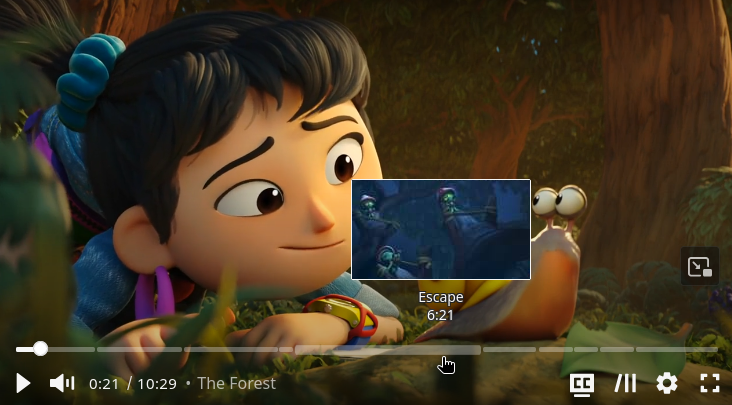
Many video playback websites like YouTube have a hover-over preview on their seekbars. I wanted one for mine too, so I set out to implement it.

YouTube preview

Generating preview images

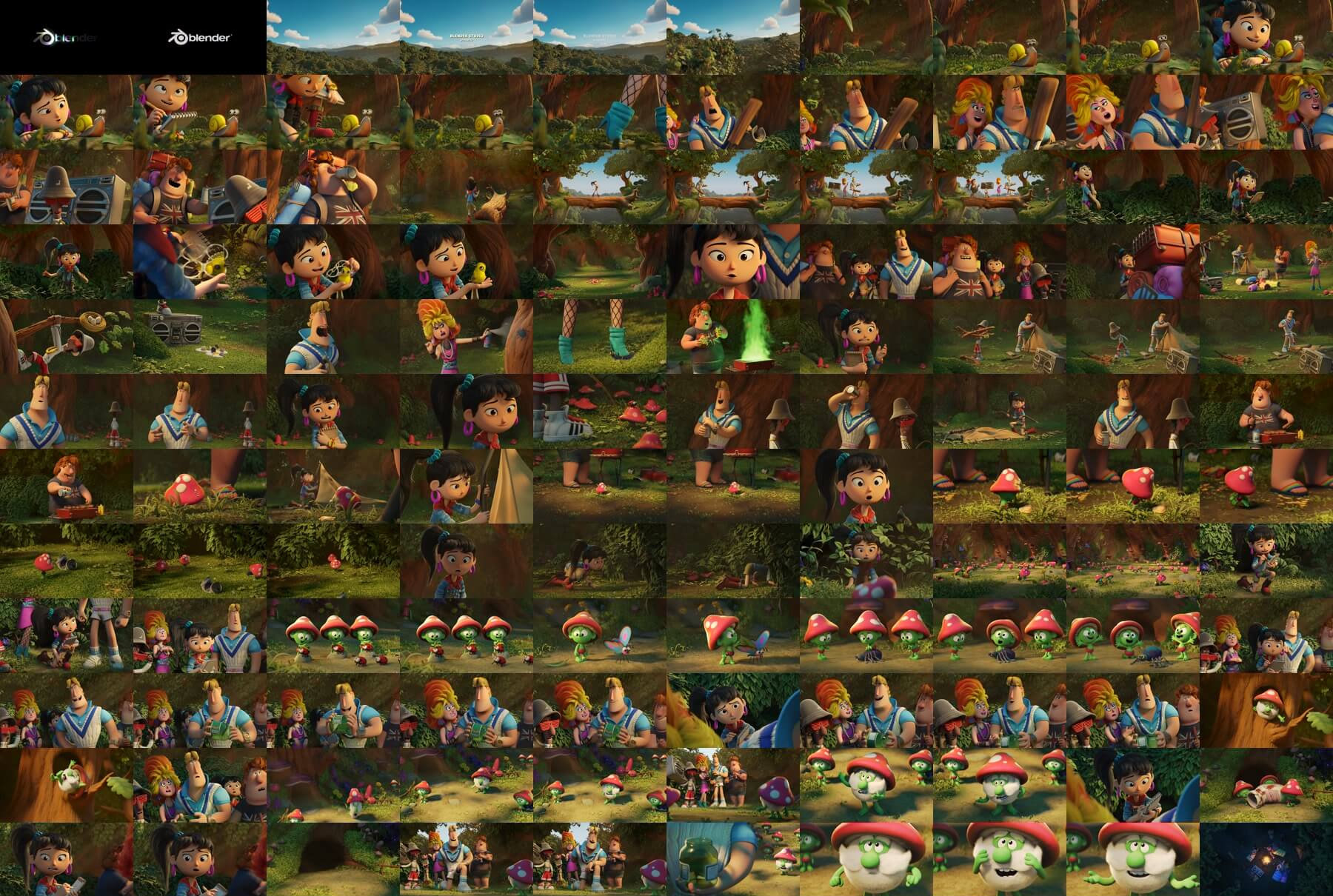
Typically, the preview images are generated by extracting frames from the video at regular intervals and compiling them into a single image grid (sample from VidStack).

Thumbnail grid from

ffmpeg, which I have been using a lot in my media pipeline, is very handy for creating such images. Below command alone can generate a sprite image grid from the input video.

1
ffmpeg -i input.mkv -vf "fps=1/interval,scale=-2:100,tile=5x20" sprite_%03d.jpg
  1. -vf
    • fps=1/interval: One frame every interval seconds.
    • scale=-2:100: Scale height to 100 pixels while maintaining aspect ratio.
    • tile=5x20: Arrange the extracted frames into a grid of 5 columns and 20 rows.
  2. sprite_%03d.jpg: Output filename pattern for the generated sprite images.

In my Go program, this is how I implemented it:

 1
 2
 3
 4
 5
 6
 7
 8
 9
10
11
12
13
14
15
16
17
18
19
// Calculate grid dimensions
cols := 5 // Standard grid width
perSheet := 100 // Max thumbs per sprite sheet
rows := perSheet / cols

// Calculate thumbnail FPS (1 thumbnail every 'interval' seconds = 1/interval fps)
fps := 1.0 / interval

// ffmpeg -i input.mkv -vf "fps=1/interval,scale=-2:100,tile=5x20" sprite_%03d.jpg
spritePattern := filepath.Join(dstDir, "sprite_%03d.jpg")
vf := fmt.Sprintf("fps=%.6f,scale=-2:%d,tile=%dx%d", fps, height, cols, rows)

_, err = util.RunCmd(*exec.Command("ffmpeg",
    "-i", src,
    "-map", fmt.Sprintf("0:%d", videoTrack.Index),
    "-vf", vf,
    "-y",
    spritePattern,
))

Generating VTT file

VTT file is used to map video timestamps to various metadata, such as subtitles or thumbnails. In this case, I used it to map timestamps to specific regions in the sprite images.

Since ffmpeg does not have a built-in way to generate VTT files for thumbnails, I wrote some simple Go code to generate it:

 1
 2
 3
 4
 5
 6
 7
 8
 9
10
11
12
13
14
15
16
17
18
19
20
21
22
23
24
25
26
27
28
29
30
31
32
33
34
35
36
37
38
39
40
41
42
43
44
45
46
47
48
49
50
51
// Continuing on from previous snippet

// Get list of generated sprite sheets
spriteFiles, err := filepath.Glob(filepath.Join(dstDir, "sprite_*.jpg"))
if err != nil {
    return "", fmt.Errorf("Error listing sprite sheets: %v", err)
}
if len(spriteFiles) == 0 {
    return "", fmt.Errorf("No sprite sheets were generated")
}

// Overestimated total number of thumbnails (loop will break early if exceeding duration)
numThumbs := len(spriteFiles) * perSheet

// Generate VTT file
vttBody := "WEBVTT\n\n"

// Calculate individual thumbnail dimensions
sw, sh, err := util.GetImageDimensions(spriteFiles[0])
if err != nil {
    return "", fmt.Errorf("Error getting sprite dimensions: %v", err)
}
thumbWidth := sw / cols
thumbHeight := sh / rows

// Generate VTT entries for each thumbnail
for i := range numThumbs {
    sheetIdx := i / perSheet
    gridIdx := i % perSheet
    row := gridIdx / cols
    col := gridIdx % cols

    startTime := float64(i) * interval
    endTime := startTime + interval
    if endTime > duration {
        endTime = duration
    }

    // Stop if exceeded the video duration
    if startTime >= duration {
        break
    }

    spriteName := filepath.Base(spriteFiles[sheetIdx])
    x := col * thumbWidth
    y := row * thumbHeight

    vttBody += fmt.Sprintf("Thumb %d\n", i+1)
    vttBody += fmt.Sprintf("%s --> %s\n", util.FormatVttTime(startTime), util.FormatVttTime(endTime))
    vttBody += fmt.Sprintf("%s#xywh=%d,%d,%d,%d\n\n", spriteName, x, y, thumbWidth, thumbHeight)
}

Complete code:

ffdata.go
  1
  2
  3
  4
  5
  6
  7
  8
  9
 10
 11
 12
 13
 14
 15
 16
 17
 18
 19
 20
 21
 22
 23
 24
 25
 26
 27
 28
 29
 30
 31
 32
 33
 34
 35
 36
 37
 38
 39
 40
 41
 42
 43
 44
 45
 46
 47
 48
 49
 50
 51
 52
 53
 54
 55
 56
 57
 58
 59
 60
 61
 62
 63
 64
 65
 66
 67
 68
 69
 70
 71
 72
 73
 74
 75
 76
 77
 78
 79
 80
 81
 82
 83
 84
 85
 86
 87
 88
 89
 90
 91
 92
 93
 94
 95
 96
 97
 98
 99
100
101
102
103
104
105
106
107
108
109
110
111
112
113
package ffmpeg

import (
    "fmt"
    "os"
    "os/exec"
    "path/filepath"
    "strconv"
    "strings"

    "[project]/logger"
    "[project]/util"
)

func (b *baseMpeg) GetVttThumb(src string, dstDir string, interval float64, height int) (string, error) {
    // first videot track
    vtracks, err := b.GetVideoTracks(src)
    if err != nil {
        return "", fmt.Errorf("Error getting video tracks: %v", err)
    }
    if len(vtracks) == 0 {
        return "", fmt.Errorf("No valid video tracks found")
    }
    videoTrack := vtracks[0]
    logger.INFO.Printf("Using video track %d for thumbnail extraction", videoTrack.Index)

    // Get video duration to calculate number of thumbnails
    duration, err := b.GetVidLen(src)
    if err != nil {
        return "", fmt.Errorf("Error getting video duration: %v", err)
    }

    // Calculate grid dimensions
    cols := 5 // Standard grid width
    perSheet := 100 // Max thumbs per sprite sheet
    rows := perSheet / cols

    // Calculate thumbnail FPS (1 thumbnail every 'interval' seconds = 1/interval fps)
    fps := 1.0 / interval

    // ffmpeg -i input.mkv -vf "fps=1/interval,scale=-2:100,tile=5x20" sprite_%03d.jpg
    spritePattern := filepath.Join(dstDir, "sprite_%03d.jpg")
    vf := fmt.Sprintf("fps=%.6f,scale=-2:%d,tile=%dx%d", fps, height, cols, rows)

    _, err = util.RunCmd(*exec.Command("ffmpeg",
        "-i", src,
        "-map", fmt.Sprintf("0:%d", videoTrack.Index),
        "-vf", vf,
        "-y",
        spritePattern,
    ))
    if err != nil {
        return "", fmt.Errorf("Error creating sprite sheets: %v", err)
    }

    // Get list of generated sprite sheets
    spriteFiles, err := filepath.Glob(filepath.Join(dstDir, "sprite_*.jpg"))
    if err != nil {
        return "", fmt.Errorf("Error listing sprite sheets: %v", err)
    }
    if len(spriteFiles) == 0 {
        return "", fmt.Errorf("No sprite sheets were generated")
    }

    // Overestimated total number of thumbnails (loop will break early if exceeding duration)
    numThumbs := len(spriteFiles) * perSheet

    // Generate VTT file
    vttBody := "WEBVTT\n\n"

    // Calculate individual thumbnail dimensions
    sw, sh, err := util.GetImageDimensions(spriteFiles[0])
    if err != nil {
        return "", fmt.Errorf("Error getting sprite dimensions: %v", err)
    }
    thumbWidth := sw / cols
    thumbHeight := sh / rows

    // Generate VTT entries for each thumbnail
    for i := range numThumbs {
        sheetIdx := i / perSheet
        gridIdx := i % perSheet
        row := gridIdx / cols
        col := gridIdx % cols

        startTime := float64(i) * interval
        endTime := startTime + interval
        if endTime > duration {
            endTime = duration
        }

        // Stop if exceeded the video duration
        if startTime >= duration {
            break
        }

        spriteName := filepath.Base(spriteFiles[sheetIdx])
        x := col * thumbWidth
        y := row * thumbHeight

        vttBody += fmt.Sprintf("Thumb %d\n", i+1)
        vttBody += fmt.Sprintf("%s --> %s\n", util.FormatVttTime(startTime), util.FormatVttTime(endTime))
        vttBody += fmt.Sprintf("%s#xywh=%d,%d,%d,%d\n\n", spriteName, x, y, thumbWidth, thumbHeight)
    }

    // Write VTT file
    vtt := filepath.Join(dstDir, "thumbnails.vtt")
    if err := os.WriteFile(vtt, []byte(vttBody), 0644); err != nil {
        return "", fmt.Errorf("Error writing VTT file: %v", err)
    }

    return vtt, nil
}
util.go
 1
 2
 3
 4
 5
 6
 7
 8
 9
10
11
12
13
14
15
16
17
18
19
20
21
22
23
24
25
26
27
28
29
30
31
32
33
34
35
36
37
38
39
40
41
42
43
44
45
46
47
package util

import (
    "fmt"
    "os/exec"
    "strconv"
    "strings"
)

func FormatVttTime(seconds float64) string {
    hours := int(seconds) / 3600
    minutes := (int(seconds) % 3600) / 60
    secs := int(seconds) % 60
    millis := int((seconds - float64(int(seconds))) * 1000)
    return fmt.Sprintf("%02d:%02d:%02d.%03d", hours, minutes, secs, millis)
}

func GetImageDimensions(imagePath string) (int, int, error) {
    // ffprobe -v error -select_streams v:0 -show_entries stream=width,height -of csv=s=x:p=0 image.jpg
    out, err := RunCmd(*exec.Command("ffprobe",
        "-v", "error",
        "-select_streams", "v:0",
        "-show_entries", "stream=width,height",
        "-of", "csv=s=x:p=0",
        imagePath,
    ))
    if err != nil {
        return 0, 0, fmt.Errorf("Error running ffprobe: %v", err)
    }

    parts := strings.Split(strings.TrimSpace(string(out)), "x")
    if len(parts) != 2 {
        return 0, 0, fmt.Errorf("Invalid ffprobe output: %s", out)
    }

    width, err := strconv.Atoi(parts[0])
    if err != nil {
        return 0, 0, fmt.Errorf("Error parsing width: %v", err)
    }

    height, err := strconv.Atoi(parts[1])
    if err != nil {
        return 0, 0, fmt.Errorf("Error parsing height: %v", err)
    }

    return width, height, nil
}

Using the thumbnails

With vidstack player, adding the generated thumbnails was quite straightforward.

 1
 2
 3
 4
 5
 6
 7
 8
 9
10
11
12
<media-player class:fullscreen bind:this={player} {title} {poster} {...restProps}>
  <media-provider>
    <!-- Other vtt tracks, e.g. subtitles and chapters -->
    <!-- {#each vtts as track} -->
    <!--   {#if ["captions", "subtitles", "chapters"].includes(track.kind)} -->
    <!--     <track src={track.src} kind={track.kind as MetaTrack} label={track.label} default={track.kind === "chapters"} /> -->
    <!--   {/if} -->
    <!-- {/each} -->
  </media-provider>
  <media-video-layout thumbnails={vtts.find(t => t.kind === "thumbnails")?.src}></media-video-layout>
  <!-- <VideoOverlay video={videoEle} /> -->
</media-player>

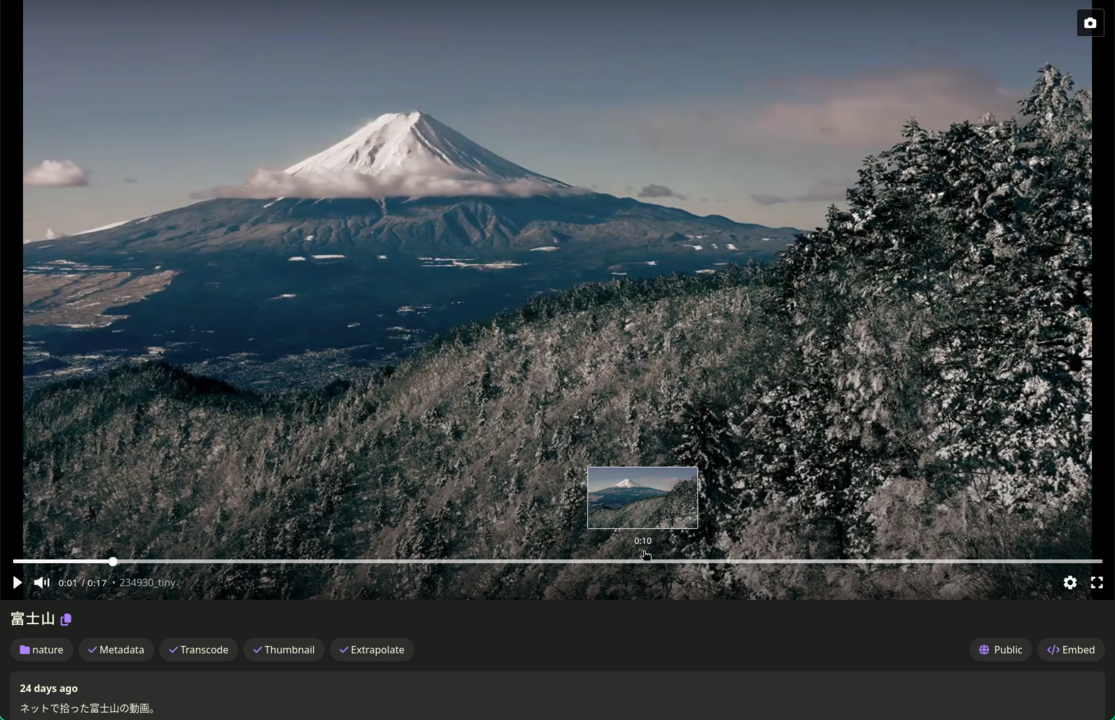
Demo here.

Demo screenshot

Built with Hugo
Theme Stack designed by Jimmy