The problem
In a recent project, there was a need to serve some static files from a NFS share.
Initially I served everything directly from a backend API server written with Go Echo framework, but it soon turned into a nightmare with all the path concatenations and partial content serving (mainly for large video files).
The reason behind serving files from the API server was authentication. I didn’t want to expose any files to the public without proper authentication, even if the URLs are randomized or changed frequently.
These are the approaches that I saw on a lot of places on the internet, but they all fall under the category of security through obscurity, which is not a good practice.
The solution
After spending some time surfing the internet, I found this: ngx_http_auth_request_module.
tl;dr: this module allows you to use Nginx to serve static files, but handle authentication with a different server.
This was exactly what I needed!
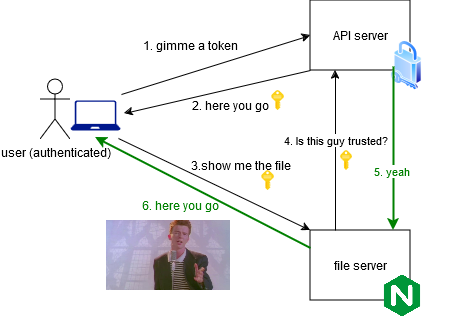
Essentially, an authenticated user can access the file:
But unauthenticated user cannot:
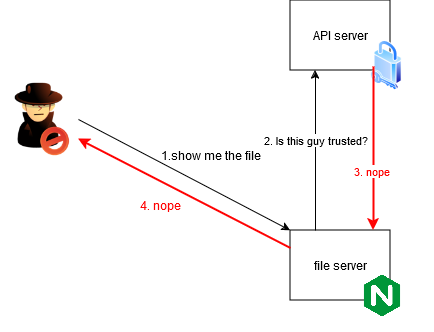
The key point is that Nginx will forward the authentication headers/cookies to the API server, making it possible to keep the authentication logic on the API server.
Implementation
Nice, but how do we do that?
Well, turns out it’s not that hard. A few lines in the Nginx configuration file was all it took.
Implementing authentication in the API server is out of scope for this post.
Step 1: Ensure the module is available
First, make sure the module is available in your Nginx installation.
1
2
|
nginx -V 2>&1 | grep -o with-http_auth_request_module
# should show "with-http_auth_request_module"
|
If you are using the official docker image like I do, it is enabled by default (as of tag nginx:bookworm).
In the example below, authentication is required for all files served from the root directory /mnt/data.
 1
 2
 3
 4
 5
 6
 7
 8
 9
10
11
12
13
14
15
16
17
18
19
20
21
22
23
24
25
|
# /etc/nginx/conf.d/default.conf

server {
  listen       80;
  listen  [::]:80;
  server_name  _;

  root /mnt/data;

  # Authentication is required for all files
  location / {
    auth_request /auth-content;
  }

  # Auth subrequest for other directories
  location /auth-content {
    internal;
    proxy_pass http://api.example.com/auth/content$request_uri; # change this

    # forward headers to the API server
    proxy_set_header Content-Type application/json;
    proxy_set_header X-Original-URI $request_uri;
    proxy_set_header X-Original-Method $request_method;
  }
}
|
With this, Nginx authenticate send a subrequest to the API server for every request it receives.
That’s it!
It was surprising to me how easy it is to set this up, and I had never had an issue with it since.
An example
Lastly, I will leave an example configuration here, which is close to what I use in my Kubernetes cluster.
 1
 2
 3
 4
 5
 6
 7
 8
 9
10
11
12
13
14
15
16
17
18
19
20
21
22
23
24
25
26
27
28
29
30
31
32
33
34
35
36
37
38
39
40
41
42
43
44
45
46
47
48
49
50
51
52
53
54
55
56
57
58
59
60
61
62
|
proxy_cache_path /tmp/nginx_cache levels=1:2 keys_zone=auth_cache:10m max_size=100m inactive=60m use_temp_path=off;

server {
  listen       80;
  listen  [::]:80;
  server_name  _;

  root /mnt/data;

  location / {
    auth_request /auth-content;
  }

  location /thumb {
    auth_request /auth-thumb;
  }

  # Auth subrequest for thumb directory
  location /auth-thumb {
    internal;
    proxy_pass http://api-server-service.example.svc.cluster.local:80/auth-media/thumb;

    # Enable caching for this location
    proxy_cache auth_cache;  # Use the defined cache zone
    proxy_cache_valid 200 1h;  # Cache 200 responses for 1 hour
    proxy_cache_use_stale error timeout updating;  # Use stale cached content in case of error or timeout
    proxy_cache_background_update on;  # Update the cache in the background
    add_header X-Cache-Status $upstream_cache_status;  # Add a header to show cache status (optional)

    proxy_set_header Content-Type application/json;
    proxy_set_header X-Original-URI $request_uri;
    proxy_set_header X-Original-Method $request_method;
  }

  # Auth subrequest for other directories
  location /auth-content {
    internal;
    proxy_pass http://api-server-service.example.svc.cluster.local:80/auth-media/content$request_uri;

    # Enable caching for this location
    proxy_cache auth_cache;  # Use the defined cache zone
    proxy_cache_valid 200 1h;  # Cache 200 responses for 1 hour
    proxy_cache_use_stale error timeout updating;  # Use stale cached content in case of error or timeout
    proxy_cache_background_update on;  # Update the cache in the background
    add_header X-Cache-Status $upstream_cache_status;  # Add a header to show cache status (optional)

    proxy_set_header Content-Type application/json;
    proxy_set_header X-Original-URI $request_uri;
    proxy_set_header X-Original-Method $request_method;
  }

  # Liveness/Readiness probe path - no authentication
  location = /healthz {
    access_log off;
    return 200 'OK';
    add_header Content-Type text/plain;
  }

  add_header 'Access-Control-Allow-Origin' '*' always;
  add_header 'Access-Control-Allow-Headers' '*' always;
  add_header 'Access-Control-Allow-Methods' 'GET, POST, OPTIONS' always;
}
|