I had been thinking about adding a commenting system to this blog for a while, but I didn’t want to use a external provider like Disqus or Commento. Those are totally valid options, but I just wanted to self-host my stuff all the way.
The task of setting up a commenting system seemed pretty complicated at first. I had to take care of HTTPS, user authentication, persistent storage, and blog integration. Recently, though, I realized that I had already set up most of the stuff needed, and there was a project that could help me with the rest: Remark42.
This self-hosted solution can handle user registration/authentication through OAuth providers, and stores blog comments in a file-based data store.
In my case, the prerequisites are satisfied as such:
- HTTPS: taken care by Traefik: Hosting an HTTPS website on a HA k3s cluster through SSH (I know, this needs to be updated)
- User authentication: handled by Remark42
- Persistent storage: available from my Ceph cluster
- Blog integration: The theme I’m using supports Remark42 integration. Hugo Theme Stack
Remark42 can be deployed either with a helm chart or with some manifests. I chose the latter to better integrate with Kustomize.
The manifest available here pretty much worked out of the box. I just extracted the secrets to the kustomization file and defined a traefik ingress. The process is pretty similar to this post: Define application manifest using Kustomize.
I used Kustomize since I wanted a staging and a production environment, but feel free to just use the manifests.
Manifests
Example directory structure:
 1
 2
 3
 4
 5
 6
 7
 8
 9
10
11
12
13
|
|-- base
|   |-- blog.yml
|   |-- comment.yml
|   `-- kustomization.yml
`-- overlays
    |-- prd
    |   |-- certificate.yml
    |   |-- ingress.yml
    |   `-- kustomization.yml
    `-- stg
        |-- certificate.yml
        |-- ingress.yml
        `-- kustomization.yml
|
Example manifests:
1
2
3
4
5
6
7
8
|
# base/kustomization.yml

apiVersion: kustomize.config.k8s.io/v1beta1
kind: Kustomization

resources:
  - blog.yml
  - comment.yml
|
  1
  2
  3
  4
  5
  6
  7
  8
  9
 10
 11
 12
 13
 14
 15
 16
 17
 18
 19
 20
 21
 22
 23
 24
 25
 26
 27
 28
 29
 30
 31
 32
 33
 34
 35
 36
 37
 38
 39
 40
 41
 42
 43
 44
 45
 46
 47
 48
 49
 50
 51
 52
 53
 54
 55
 56
 57
 58
 59
 60
 61
 62
 63
 64
 65
 66
 67
 68
 69
 70
 71
 72
 73
 74
 75
 76
 77
 78
 79
 80
 81
 82
 83
 84
 85
 86
 87
 88
 89
 90
 91
 92
 93
 94
 95
 96
 97
 98
 99
100
101
102
103
104
105
106
107
108
109
110
111
112
|
# base/comment.yml

# use the default storage class
apiVersion: v1
kind: PersistentVolumeClaim
metadata:
  name: remark42
spec:
  accessModes:
    - ReadWriteOnce
  resources:
    requests:
      storage: 10Gi

---

apiVersion: apps/v1
kind: Deployment
metadata:
  name: remark42
  labels:
    app: remark42
spec:
  replicas: 1
  selector:
    matchLabels:
      app: remark42
  strategy:
    type: Recreate
  template:
    metadata:
      labels:
        app: remark42
    spec:
      containers:
        - name: remark42
          image: ghcr.io/umputun/remark42:v1.14.0
          ports:
            - containerPort: 8080
          env:
            - name: REMARK_URL
              valueFrom:
                configMapKeyRef:
                  name: blog-cm
                  key: COMMENT_URL
            - name: SITE
              valueFrom:
                configMapKeyRef:
                  name: blog-cm
                  key: BLOG_NAME
            - name: SECRET
              valueFrom:
                secretKeyRef:
                  name: remark42
                  key: SECRET
            - name: AUTH_GOOGLE_CID
              valueFrom:
                secretKeyRef:
                  name: remark42
                  key: AUTH_GOOGLE_CID
            - name: AUTH_GOOGLE_CSEC
              valueFrom:
                secretKeyRef:
                  name: remark42
                  key: AUTH_GOOGLE_CSEC
            - name: AUTH_GITHUB_CID
              valueFrom:
                secretKeyRef:
                  name: remark42
                  key: AUTH_GITHUB_CID
            - name: AUTH_GITHUB_CSEC
              valueFrom:
                secretKeyRef:
                  name: remark42
                  key: AUTH_GITHUB_CSEC
            - name: ADMIN_SHARED_ID
              value: <admin-shared-id> # this can be arbitrary
            - name: TIME_ZONE
              value: "America/Denver"
          volumeMounts:
            - name: srvvar
              mountPath: /srv/var
          securityContext:
            readOnlyRootFilesystem: false
          resources:
            requests:
              cpu: "100m"
              memory: "25Mi"
            limits:
              cpu: "1"
              memory: "1Gi"
      securityContext:
        # Has its own root privilege drop. Can't do runAsUser / runAsGroup.
      volumes:
        - name: srvvar
          persistentVolumeClaim:
            claimName: remark42

---

apiVersion: v1
kind: Service
metadata:
  name: remark42-web
spec:
  selector:
    app: remark42
  ports:
    - name: http
      protocol: TCP
      port: 8080
      targetPort: 8080
|
 1
 2
 3
 4
 5
 6
 7
 8
 9
10
11
12
13
14
15
16
17
18
19
20
21
22
23
24
25
26
27
28
|
# overlays/prd/kustomization.yml

apiVersion: kustomize.config.k8s.io/v1beta1
kind: Kustomization
resources:
- ../../base
- ingress.yml
- certificate.yml
namespace: blog
replicas:
- name: blog
  count: 2
images:
- name: jyking99/blog # image for the blog itself
  digest: <digest> # updated by ArgoCD Image Updater
configMapGenerator:
- name: blog-cm
  literals:
  - BLOG_NAME=jy-blog
  - COMMENT_URL=https://comment.blog.junyi.me
secretGenerator:
- name: remark42
  literals:
  - SECRET=<secret> # this can be arbitrary
  - AUTH_GOOGLE_CID=<google-client-id>
  - AUTH_GOOGLE_CSEC=<google-client-secret>
  - AUTH_GITHUB_CID=<github-client-id>
  - AUTH_GITHUB_CSEC=<github-client-secret>
|
See below for how to obtain the client IDs and secrets.
 1
 2
 3
 4
 5
 6
 7
 8
 9
10
11
12
13
14
15
16
17
18
19
20
21
22
23
24
25
26
27
28
29
30
31
32
33
34
35
|
# overlays/prd/ingress.yml

apiVersion: networking.k8s.io/v1
kind: Ingress
metadata:
  name: blog
  annotations:
    spec.ingressClassName: traefik
spec:
  rules:
    - host: blog.junyi.me
      http:
        paths:
        - path: /
          pathType: Prefix
          backend:
            service:
              name: blog
              port:
                number: 80
    - host: comment.blog.junyi.me
      http:
        paths:
        - path: /
          pathType: Prefix
          backend:
            service:
              name: remark42-web
              port:
                number: 8080
  tls:
    - hosts:
        - "blog.junyi.me"
        - "comment.blog.junyi.me"
      secretName: junyi-me-production
|
 1
 2
 3
 4
 5
 6
 7
 8
 9
10
11
12
13
14
15
16
|
# overlays/prd/certificate.yml

apiVersion: cert-manager.io/v1
kind: Certificate
metadata:
  name: junyi-me-prod
spec:
  secretName: junyi-me-production
  issuerRef:
    name: letsencrypt-production
    kind: ClusterIssuer
  commonName: "*.junyi.me"
  dnsNames:
  - "junyi.me"
  - "*.junyi.me"
  - "*.blog.junyi.me"
|
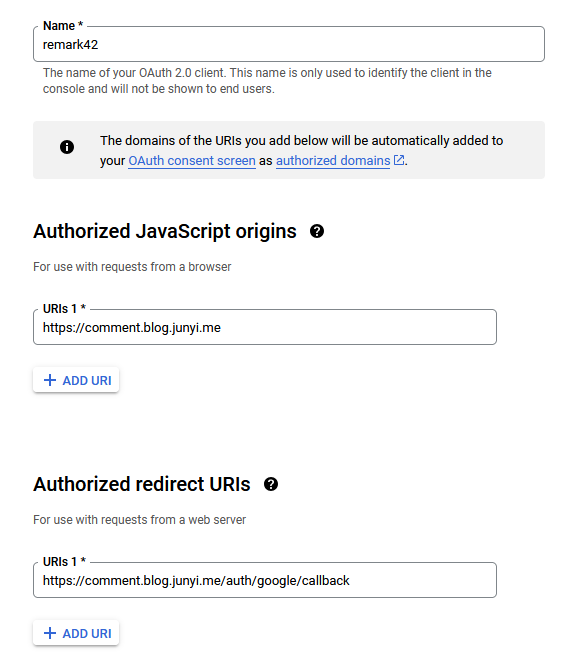
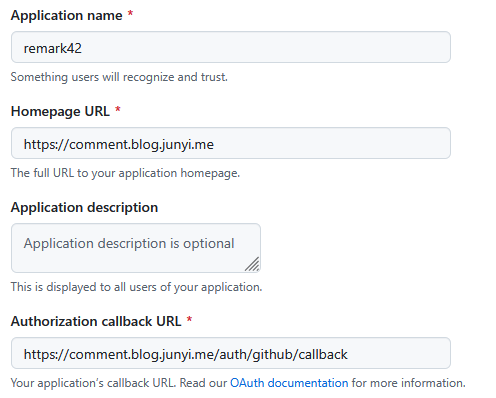
In the provided manifest, we have to specify the Google and GitHub OAuth client IDs and secrets. Here is how to set up OAuth clients for each provider and get their IDs and secrets.
Google OAuth
- Go to Google Auth Platform / Clients (create a project if you don’t have one)
- Click on “Create client”
- Fill in the details like this:
- Clicking on “Create” will give you the client ID and secret.
GitHub OAuth
- Go to
settings / OAuth Apps in your GitHub account or organization.
- Click on “New OAuth App”
- Fill in the details like this:
- Clicking on “Register application” will give you the client ID and secret.
Hugo Theme Stack integration
Confirm the above is working by running kubectl apply -k overlays/prd. If everything is set up correctly, A Remark42 instance should be running in your cluster.
This part is specific to the theme Hugo Theme Stack. For other themes, consult the theme documentation.
Modify the params.comments section as such:
1
2
3
4
5
6
7
8
|
    comments:
        enabled: true
        provider: remark42

        remark42:
            host: REMARK42_URL
            site: jy-blog
            locale: en
|
The URL REMARK42_URL is just a placeholder here. In my case it will be updated by the GitHub Actions workflow. Feel free to hardcode it.
GitHub Actions workflow
Since I have an existing workflow that updates the blog image, I just added a step to update the Remark42 URL. Here is the relevant part:
1
2
3
4
5
6
7
8
|
  - name: Set remark42 URL
    run: |
      if [ $BRANCH_NAME == 'master' ]; then
        REMARK42_URL=https://comment.blog.junyi.me
      else
        REMARK42_URL=https://comment.blog.i.junyi.me
      fi
      sed -i "s|REMARK42_URL|$REMARK42_URL|g" hugo.yml
|
This will separate the production and staging Remark42 instances.
Conclusion
This is all the steps I took to get a comments section as below working.