
Note-taking app has now become a central piece of my daily life and developer workflow. I started off with Evernote, then migrated everything to Obsidian, drawn to the idea that everything was just a bunch of plain files: all my notes are stored as markdown files, and links and attachments being merely wikilinks pointing to other files.
As I got into the rabbithole of self-hosting, it occurred to me that I could self-host these notes as well.
It’s not that I have anything against the official Obsidian Sync service - in fact I loved it for the seamless syncing experience, and the monthly cost of $4 seemed very reasonable to me. I just couldn’t help but think it was “lame” having a homelab and not self-hosting my own notes, and it would be “cool” to have a self-hosted setup that works as seamlessly as the official solution.
These were the requirements I had in mind:
- Self-hosted sync
- Works on mobile, Windows, and Linux
- Fairly mature and popular (not someone’s experimental project)
- Does not require manual syncing
I explored several options, and finally settled on Obsidian LiveSync.
Obsidian Remotely Save plugin with NextCloud WebDAV
The first solution I looked into was the Remotely Save community plugin.
I am already running a NextCloud instance on my home lab kubernetes cluster, and NextCloud’s WebDAV was explicitly listed as a supported backend for Remotely Save. It seemed like a natural fit for my existing setup.
All I had to do was set up an app password on NextCloud side:
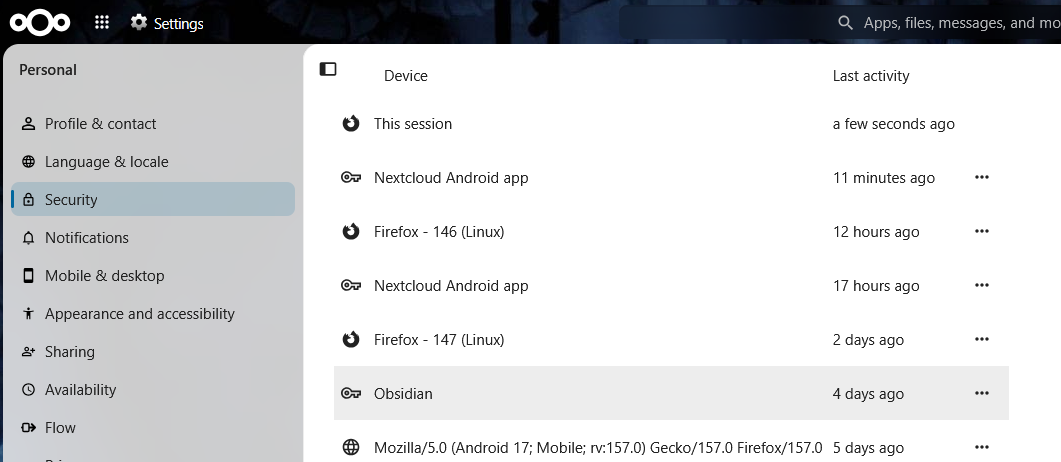
create a folder in NextCloud to store the notes, and then configure the plugin to point to the WebDAV URL like the following, with the app password.
|
|
It worked, but…
- Self-hosted sync
- Works on mobile, Windows, and Linux
- Fairly mature and popular (not someone’s experimental project)
- Does not require manual syncing
sadly did not work on my phone. It worked flawlessly on my Linux and Windows computers, but nothing was being pushed or pulled on mobile.
So I had to move on.
Joplin
At this point, I thought maybe I should look into some other apps which has first-party self-hosted syncing support. Afterall, Obsidian’s official sync service is not self-hosted, and surely there would be less friction if the app itself supported self-hosted syncing.
Joplin looked very promising. It was mature, had a large community, and had an official container image for the sync backend.
So I decided to give it a shot by hosting it on my kubernetes cluster.
joplin.yml
|
|
expose.yml
|
|
secret.yml
|
|
Secrets
|
|
Postgres
|
|
Once the pod was running, the client-side config was very straightforward. Just enter the server URL and credentials, and joplin started to sync right away.
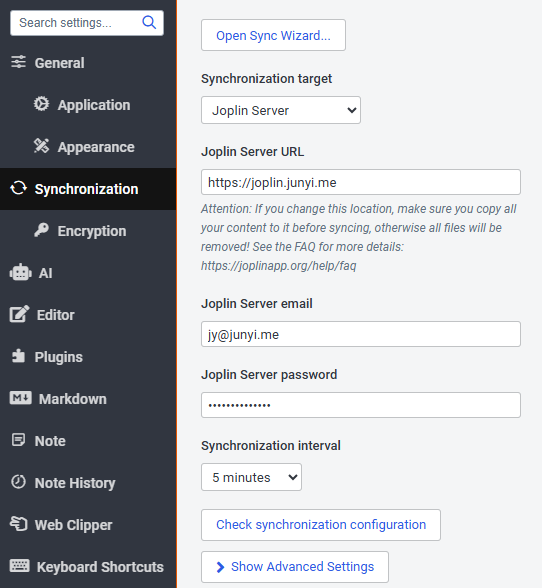
I tested syncing between two computers and a phone, and everything was going smoothly. Although I set the “Synchronization interval” to 5 minutes, the sync felt instantaneous after each edit. So,
- Self-hosted sync
- Works on mobile, Windows, and Linux
- Fairly mature and popular (not someone’s experimental project)
- Does not require manual syncing
Finally something that ticks all those boxes! However, since this would be an app switch, there were certainly some trade-offs.
- There was no way to sync settings and plugins.
- Keybindings can be exported and imported, but the process feels tedious especially when setting things up.
- Linking felt a bit clunky - no way to set up keybindings to create a link and follow a link.
- vim support is built-in, which is great, but some keybindings only work in insert mode
I tried joplin for a while, but as someone who uses vim keybindings and want to use keyboard as much as possible, issues 3 and 4 were bothering me too much.
I considered looking into some plugins to improve the experience, but issue 1 made me decide looking into some other options first. Setting up plugins and configs once is okay, but setting them up on every device seemed like a hustle.
Other note-taking apps
Logseq
This is an interesting one. I’ve seen a lot of positive feedback about its approach to note-taking.
As I understand, Logseq organizes everything by blocks instead of notes. The blocks can be nested inside of other blocks, can individually become tasks and be tagged, and individually referenced by other blocks.
The concept sounded efficient, and it got me interested to learn more about it.
Howerver, the more I learn about it, the more it seems that the syncing functionality is limited, and there doesn’t seem to be a lot of active development going on.
- Self-hosted sync
- Works on mobile, Windows, and Linux
- Fairly mature and popular (not someone’s experimental project)
- Does not require manual syncing
Trilium Notes
This is another pretty popular option for note taking, with built-in support for self-hosted syncing.
The lack of mobile app and the markdown editor were what kept me from trying it out.
- Self-hosted sync
- Works on mobile, Windows, and Linux
- Fairly mature and popular (not someone’s experimental project)
- Does not require manual syncing
Obsidian LiveSync with CouchDB
Having looked into some other options, I still liked the note-taking experience of Obsidian the best. I decided to explore some other Obsidian plugins.
Obsidian Livesync was the obvious choice here, and I ended up sticking to it. It is another Obsidian community plugin which uses CouchDB as its backend.
I had previously avoided this because the CouchDB setup process looked a bit tedious, but having seen the overwhelmingly positive reviews on Reddit, I decided to give it a try.
For the backend, a standard CouchDB instance was sufficient. I used ArgoCD to deploy the official CouchDB helm chart, following the Obsidian Livesync setup guide.
Manifests and secrets
obsidian-couch.yml
|
|
secret.yml
|
|
Secrets
|
|
Per-user DB setup
This was the part that felt a bit tedious for me. For each new Obsidian vault, a new CouchDB database has to be created. For now it’s alright for me since I’m the only user using it and I usually put everything into a single vault.
DB setup
|
|
The last command spit out the following output, which was needed in the client setup.
|
|
Client setup
Before setting this up, make sure the vault is backed up by other means. I used Obsidian Sync.
Once everything is backed up, turn OFF any automatic backup functionalities other than Obsidian Livesync.
When setting up the first client, the client has to sync all the local files to the CouchDB database. This was done in the Self-hosted Livesync plugin settings in Obsidian.
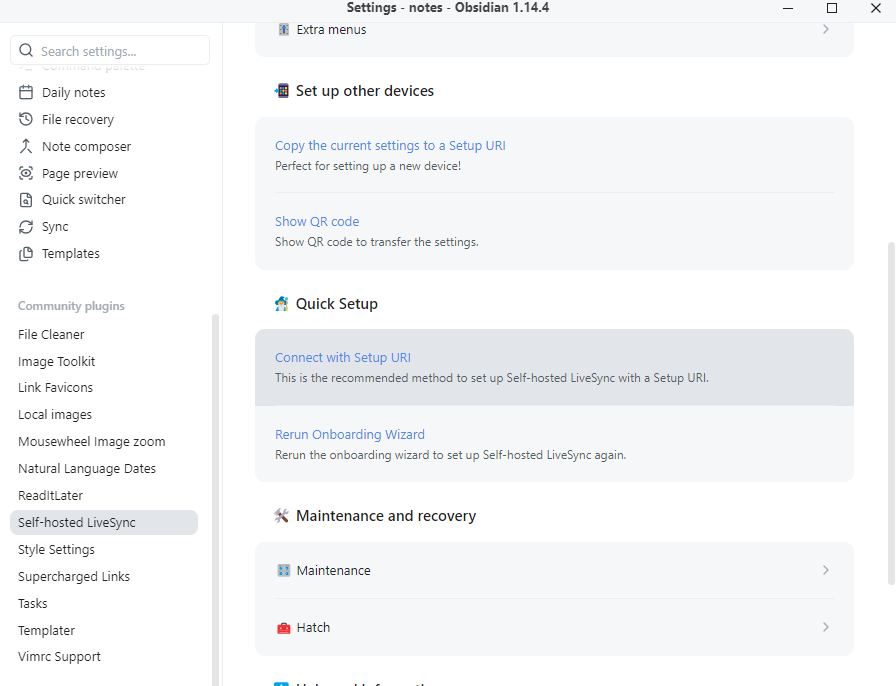
The documentation on their github was pretty easy to follow.
For the other devices, the process was similar: just had paste in the same URL and follow the prompts (also in documentation).
Test run
After setting up the plugin, the plugin immediately started syncing to CouchDB. The option in command palette “Self-hosted LiveSync: Show Log” was very handy to see what’s going on.
The first sync took me about 20 minutes, with the vault taking up 3GB or so. After that an overlay was displayed on top-right corner, and it started to react to any changes and show syncing status.

The last thing I tweaked was the synchronization preset. I set it to “LiveSync” for the most real-time experience possible.
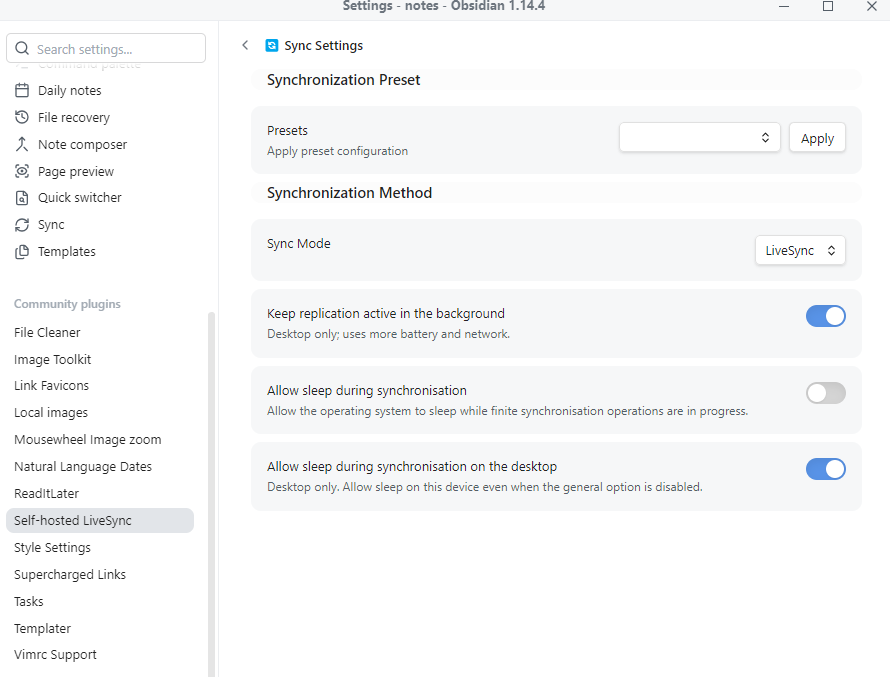
Then I tested
- Editing on Linux desktop, viewing on mobile
- Editing on mobile, viewing on Linux desktop
- Same thing, but with note and attachment creation
- Deleting files
All worked flawlessly.
So far so good
I have been using this setup for a week now, with various devices and connection conditions, and so far, it’s doing a great job.
Devices: Linux desktop and laptop, windows laptop, and Android phone.
Locations: home, public and private wifi away from home, and on the plane (offline, successfully synced right after landing).
Sometimes right after adding a new device, it refuses to push changes to server (pull works), but as per my experience, the issue goes away after a restart of the app. Other than that, it’s been very reliable.